Thermometer++ Room Temperature
- 4.4
- Rating
- 10.00M
- Installs
- Free
- Price

 Analysis by App-foxy
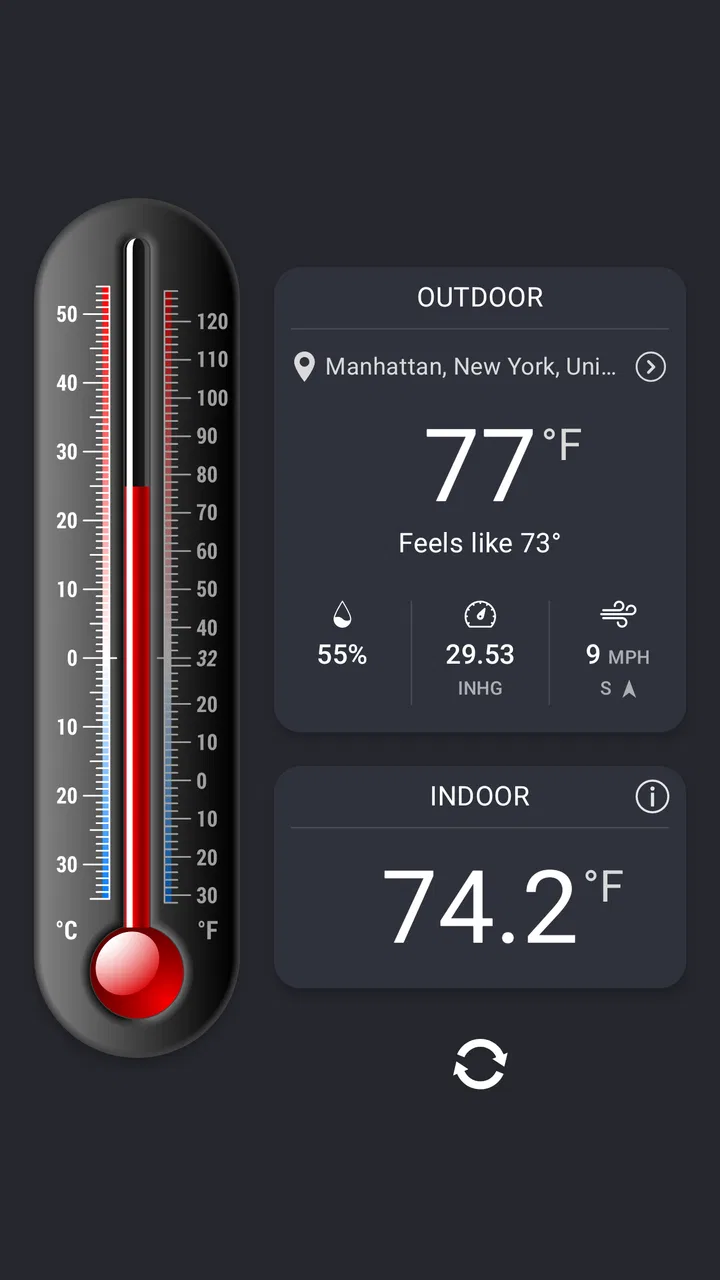
I started using Thermometer++ Room Temperature because I wanted a quick way to check the conditions around my home without turning a simple question into a full weather-report routine. It is a free weather app from Singulario Apps, aimed at showing temperature and related readings in a straightforward format. After spending time with it, I found its strongest quality is convenience: it gives a compact view of indoor and outdoor conditions, humidity, pressure, and wind in one place.
That focus makes it especially practical on a shared phone or tablet. Someone can open it before leaving for school, another person can check the room before going to bed, and nobody needs to create a separate account just to see a reading. I like that low-friction approach. At the same time, I would not treat it as a replacement for a dedicated household sensor or a professional weather instrument. It is best understood as an accessible reference tool, not a precision monitoring system.
How it fits into a shared household routine
When a household shares a device for quick checks, I find it helps to agree on what the reading is meant to answer: comfort in one room, or conditions outside before heading out. That small distinction keeps people from treating different measurements as though they were interchangeable. It also makes the next question more useful: how to turn a quick glance into a routine that works for everyone.
You May Also Like

 AccuWeather: Weather Radar
AccuWeather Review: A Quick, Clear Forecast for Everyday Decisions
For everyday plans, the best forecast is the one you can understand quickly. AccuWeather makes rain timing, radar, and local conditions easy to act on, with a few trade-offs.

 Hill Climb Racing
Why Hill Climb Racing Still Turns Crashes Into One More Run
A tiny car, a bumpy hill and one more upgrade: Hill Climb Racing keeps resurfacing because its simple chaos makes every near-miss feel personal.

 AliExpress - Shopping App
AliExpress Makes Global Shopping Feel Personal, but Shoppers Bear the Risk
AliExpress turns a global marketplace into a pocket-sized discovery engine. Its reach is useful, its shopping loop compelling, and its trade-offs easy to miss.

 Lords Mobile: Kingdom Wars
Lords Mobile Is a Kingdom-Building Routine, Not a Quick Match
A case-by-case verdict on the building, battles, device demands, and social commitments that make Lords Mobile rewarding for some players and exhausting for others.

 PDF Scanner app - TapScanner
TapScanner Makes Paperwork Easier to Capture, Check, and Share
TapScanner makes scanning with a phone feel less like a rescue operation and more like a dependable step in getting work done. Its capture tools are useful, though not flawless.

 Block Blast!
 Shows How Much a Puzzle Game Can Leave Out
A quiet grid game shows why puzzle players increasingly value instant clarity, repeatable skill and low-pressure play—and where the genre still needs to catch up.
More From Our News Desk
View All News


A useful glance before everyone leaves
In a busy home, weather decisions tend to happen in small moments. I might check the outside temperature before choosing a jacket, while someone else wants to know whether a room feels unusually damp. Thermometer++ Room Temperature works well for these quick checks because its purpose is easy to understand: open the app, look at the current information, and make a practical decision.
The combination of temperature, humidity, pressure, and wind is more useful than temperature alone. A cool reading with strong wind can feel very different from the same temperature on a calm day. Likewise, humidity can explain why a room feels uncomfortable even when the temperature itself looks ordinary. I found that these extra readings are most valuable when I use them as context rather than as isolated numbers.
A realistic household example would be a morning when several people are preparing for the day. One person checks the outdoor conditions before walking to work, another decides whether to open a window, and a child asks whether a coat is necessary. The app can support all three conversations, but it does not make the decision for you. That is a strength, because the information remains readable instead of being buried under forecasts, maps, alerts, or social features.
Shared devices and simple handoffs
On a shared device, simplicity matters more than personalization. A weather app that requires every person to maintain a separate profile can become annoying when all anyone wants is a current reading. Thermometer++ Room Temperature feels better suited to casual household use because the central task is visible immediately.
I would still establish a small household habit: decide which device is the main reference point and keep it in a familiar place. If different people check different phones from different locations, they may see information that does not line up perfectly. That is not necessarily a fault in the app; weather conditions can vary by location, and indoor readings depend heavily on the device and surroundings. A shared routine reduces confusion.
Another useful habit is to say what the reading is being used for. “The room feels humid” is a different question from “What should I wear outside?” The app can help with both, but the relevant measurements are not identical. I found that family discussions became clearer when we looked at humidity for comfort indoors and wind for outdoor planning instead of treating every displayed value as equally important.
What the app can and cannot tell a household
The name may lead some people to expect a physical thermometer built into the phone. I would be careful with that assumption. A phone app can present temperature information, but the reliability of an indoor reading depends on the device, its sensors, and the environment. If the phone has been charging, sitting in direct sunlight, or held in someone’s hand, the result may not represent the room accurately.
For that reason, I would use the app to notice broad changes rather than to settle a dispute over a tiny difference. It is helpful when deciding whether a room is becoming warmer, whether outdoor conditions look pleasant, or whether humidity deserves attention. It is not the tool I would choose for protecting temperature-sensitive equipment, managing a nursery with strict precision, or making a health-related decision.
My practical rule is to use the readings for everyday awareness, not as a substitute for a dedicated physical instrument. That distinction prevents the most common disappointment and makes the app much more useful.
Beginning without overcomplicating the setup
The app is available for free and is rated for Everyone, which makes it approachable for a household with mixed ages. Its current version is 6.9.2, and it runs on devices using Android 8.0 or later. Those details matter when a family keeps an older phone as a kitchen or hallway device. Before choosing that spare device, I would check its operating system rather than assuming every older handset can run the latest version.
When I set up an app like this for shared use, I prefer to keep the process deliberately narrow. I first open it in the place where it will actually be used, inspect the displayed conditions, and then decide whether the device is showing the environment I care about. A phone kept beside a hot appliance or near a sunny window is a poor reference point, regardless of how clean the interface looks.
I also recommend avoiding the temptation to make the app responsible for every weather question in the home. Its value comes from being quick. If someone needs a multi-day forecast, radar, severe-weather notifications, or detailed travel planning, a conventional full-featured weather service may be a better companion. Thermometer++ Room Temperature is more appealing when the household wants a compact conditions check.
Boundaries around indoor readings
Indoor temperature is one of the areas where expectations need the most care. A phone is not automatically a room sensor. Even when the app presents an indoor value, I would compare it with the actual comfort of the room and, if accuracy is important, with a standalone thermometer. The app can still be useful for spotting a general pattern, but I would not use one phone in one corner to represent every room.
That matters in shared homes with different spaces. A bedroom, kitchen, and enclosed balcony can have noticeably different conditions. If the household wants to compare them, the device should be placed consistently and allowed to settle before anyone draws conclusions. Moving it from a warm pocket to a cool table and immediately comparing the numbers can create a misleading impression.
This is one of the less obvious trade-offs of the app: its convenience encourages frequent checking, but frequent checking is not the same as precise measurement. I get the best results when I use it as a quick environmental reference and keep my conclusions appropriately broad.
Outdoor planning without turning it into a forecast center
The outdoor information is useful for immediate decisions, particularly when temperature and wind need to be considered together. I found wind to be the reading most likely to change my decision about a short walk. A mild temperature can still feel unpleasant when the air is moving strongly, while a cooler but calm day may be comfortable with the right clothing.
Humidity also adds context, although it is easy to overinterpret. High humidity can make warm air feel heavier, but the number alone does not describe the entire outdoor experience. I prefer to combine it with the temperature and the actual conditions outside. This approach keeps the app helpful without pretending that one screen can capture every detail of local weather.
For longer journeys, I would use a broader weather service instead. Thermometer++ Room Temperature suits the question “What is it like right now?” better than “What will happen throughout my trip?” That distinction is important for parents coordinating school runs, commuters planning a route, or anyone deciding whether to carry rain gear for later.
Coordinating decisions without shared accounts
A household does not need every person to use the app in the same way. One adult may care about pressure changes, another may focus only on temperature, and a teenager may open it only before leaving. I like that the information can support separate routines without requiring a family dashboard or a formal coordination system.
In practice, I would keep coordination verbal and simple. If someone says the room is too humid, another person can open the app and look at the same general conditions. If the family is leaving together, one person can check the outdoor reading while everyone else gets ready. The app helps create a shared point of reference, but it does not replace communication about where the reading was taken or what decision needs to be made.
This also means the app is not ideal for households that expect automatic alerts, remote monitoring, or a history that everyone can review from separate accounts. Those needs belong to connected sensors and specialized home-monitoring systems. Choosing this app for that purpose would create frustration because its appeal is its direct, on-device simplicity.
Trust, privacy expectations, and younger users
Because the content rating is Everyone, I would feel comfortable letting a child open the app to learn about temperature, humidity, wind, or pressure. The information is easy to discuss in everyday terms, and it can turn a routine weather check into a small science lesson. A parent can ask why the same temperature feels different on a windy day or why opening a window changes how a room feels.
Still, age suitability does not mean every reading should be accepted without explanation. Younger users may assume that a displayed number is exact or that “indoor temperature” describes the entire home. I would show them where the device is located and explain that a phone is not the same as a dedicated sensor. That small conversation builds better habits than simply handing over the device and treating the screen as unquestionable.
For shared use, I also prefer a clear boundary between checking conditions and making important decisions. A child can use the app to ask whether it is cold outside, while an adult decides about suitable clothing, travel, heating, or ventilation. The app supports awareness; it should not become the sole authority for health, safety, or equipment protection.
There is another trust issue: the app’s free availability makes it easy to try, but optional in-app purchases range from $0.99 to $5.49 per item. In a family setting, I would make sure the person using the shared device understands that free installation does not necessarily mean every optional item is included. Clear household purchasing rules avoid accidental spending and keep the app’s role uncomplicated.
What the wider reception suggests
The app has an average rating of 4.4 from around 229 thousand ratings, with more than a thousand written reviews, and it has passed ten million installs. Those figures suggest that many people find the basic idea useful, especially when they want a simple temperature-focused tool rather than a crowded weather platform.
I would not read that popularity as proof that it will suit every phone or every household. Weather readings are especially sensitive to location, hardware, and expectations. A person looking for a sensor-grade indoor monitor may judge it harshly, while someone wanting a fast glance before opening a window may appreciate it immediately. The same app can feel excellent or inadequate depending on the question being asked.
Where it beats the usual weather alternatives
Compared with a standard weather app, Thermometer++ Room Temperature feels more focused. Many weather alternatives prioritize forecasts, maps, radar layers, news, alerts, and location-based planning. Those features are valuable, but they can slow down the simple task of checking current conditions. Here, the emphasis is closer to a compact thermometer and environmental dashboard.
That focus is particularly good on an older shared device. A family can keep a spare phone available for quick checks instead of using a newer personal phone for every small question. The app also makes sense for someone who finds large weather apps overwhelming and wants temperature-related information without navigating through several panels.
The trade-off is that a full weather service remains better for planning ahead. If I were deciding whether to schedule an outdoor event, preparing for a trip, or tracking a developing storm, I would choose the broader service. If I only wanted to compare indoor comfort with current outdoor conditions, this app would be faster and less distracting.
Where a dedicated sensor or another app is better
A physical indoor thermometer is the better choice when the exact room reading matters. It can be placed permanently in the space being monitored and avoids some of the uncertainty that comes from using a phone as the reference device. Homes with babies, musical instruments, plants, wine storage, or sensitive electronics may reasonably want that extra consistency.
A conventional forecast app is also better when the household needs future conditions, notifications, or location planning. Thermometer++ Room Temperature should not be selected simply because it displays weather-related measurements. Its advantage is the immediate, focused view, not the breadth of a complete forecasting system.
I would also skip it if the main goal is automatic household coordination. There is a difference between several people being able to open the same app and several people receiving synchronized updates from a connected monitoring system. The former is what this app supports naturally; the latter requires a different category of tool.
Small habits that improve the experience
My first tip is to keep the reference device away from obvious heat sources. A phone beside a radiator, cooker, window, or charging brick can give an impression of the surrounding room that is not representative. Even without changing any setting, choosing a sensible location makes the displayed information more useful.
My second tip is to read temperature and humidity together when judging indoor comfort. Temperature alone may explain why a room feels warm or cold, but humidity often explains why it feels stuffy or heavy. This is a simple workflow, yet it is more informative than repeatedly refreshing a single number.
My third tip is to use wind as a clothing and travel adjustment rather than treating it as background information. Before a walk, I check the outdoor temperature, then look at wind and decide whether the conditions will feel harsher than the temperature suggests. That small sequence is more practical than relying on temperature alone.
Finally, I would avoid comparing readings from different household devices as if they were laboratory instruments. If two people see different values, first check whether the phones are in different places or have recently been used heavily. The right response is usually to standardize the location and purpose of the check, not to assume one person is wrong.
My household verdict
After using it as a practical weather companion, I see Thermometer++ Room Temperature as a good fit for households that want quick access to current temperature and related environmental information. It is free to start, suitable for Everyone, and approachable enough for a shared device. Its long availability since May 9, 2012, and broad install base also show that the concept has remained relevant to a large audience.
I would recommend it to a family that wants a simple reference before opening windows, choosing clothes, or discussing why a room feels uncomfortable. I would also recommend it to users who dislike the clutter of large forecast apps and mainly care about immediate conditions.
I would not recommend relying on it alone for precise indoor monitoring, health decisions, sensitive equipment, or detailed future planning. In those situations, a physical thermometer, connected sensor, or full forecast service is the more responsible choice. For everyday household coordination, though, it strikes a useful balance: quick enough for casual checks, informative enough to support better conversations, and simple enough that different ages can use it without needing separate accounts or complicated routines.
My final opinion is straightforward: this is a focused tool, and it works best when I respect that focus. Used as a convenient snapshot rather than an unquestionable measurement system, it earns a place on a shared household device.
FAQs for Thermometer++ Room Temperature
01How accurate is Thermometer++ Room Temperature?
Thermometer++ Room Temperature provides a general estimate of the room temperature by using your device’s sensors and location data. While it offers a convenient way to check the temperature, it may not be as precise as dedicated thermometers. For critical measurements, using a specialized device is recommended.
02Does Thermometer++ Room Temperature require an internet connection?
The app can function offline as it primarily uses your device’s built-in sensors. However, for enhanced accuracy and additional features like weather forecasts, an internet connection is beneficial. Connecting to the internet allows the app to access updated data and provide a more comprehensive analysis.
03Is Thermometer++ Room Temperature free to use?
Thermometer++ Room Temperature offers a free version with basic features, supported by ads. Users can opt for a premium version through in-app purchases, which removes ads and unlocks additional features. This flexibility allows users to choose the version that best fits their needs and preferences.
04Can Thermometer++ Room Temperature measure outdoor temperatures?
While the main function of Thermometer++ is to measure indoor temperature, it can provide outdoor temperature information by accessing online weather services. This feature requires an internet connection to pull the latest data from weather databases, offering users a complete overview of both indoor and outdoor conditions.
05What devices are compatible with Thermometer++ Room Temperature?
Thermometer++ Room Temperature is compatible with most Android and iOS devices. It utilizes the sensors available on your smartphone or tablet, making it accessible to a wide range of users. Always ensure your device’s operating system is up-to-date to enjoy the app’s full functionalities without any issues.
Pros
- Accurate temperature readings.
- User-friendly interface.
- No internet required.
- Quick setup process.
- Customizable settings.
Cons
- Ads can be intrusive.
- Limited free features.
- Requires location access.
- Occasional app crashes.
- Battery consumption is high.

Thermometer++ Room Temperature
Gallery